Mosaics
Group multi-panel projects, visualize sky coverage, and use mosaic auto-detection
Mosaics let you group multiple projects that together cover a larger area of the sky. For example, if you image the Andromeda Galaxy in four overlapping panels, you can combine them into a single mosaic and visualize the full coverage on the sky map.
Creating a Mosaic
Mosaics can be created in two ways:
- Auto-detection - DeepSkyLog scans your projects and groups them based on naming patterns (see below)
- Manually - open the Mosaics section and assemble panels by hand
Naming Patterns for Auto-Detection
DeepSkyLog recognizes a common base name plus a panel identifier. The following patterns are supported:
| Pattern | Example |
|---|---|
<target> Panel <number> | M 31 Panel 1, M 31 Panel 2 |
<target> Panel <number> of <total> | M 31 Panel 1 of 4 |
<target> Panel <number>/<total> | M 31 Panel 1/4 |
<target> P<number> | M 31 P1, M 31 P2 |
The base name (everything except the panel identifier) must match exactly between projects. For example, “M 31 Panel 1” and “M 31 Panel 2” share the base name “M 31” and will be detected as a mosaic.
Projects without a recognizable panel identifier will not be included in auto-detection. You can rename your projects (e.g., “My Target Panel 1”) and run auto-detection again, or create a mosaic manually.
Panel Positioning
If your projects have RA/Dec coordinates (from FITS headers), DeepSkyLog uses those coordinates to automatically determine the correct grid position for each panel. If coordinates are not available, it falls back to the panel number order.
Adding New Panels to an Existing Mosaic
When you run auto-detection and DeepSkyLog finds new projects that match an existing mosaic’s name, it will offer to add just the new panels. The new panels are placed in empty grid positions based on their coordinates.
Visualizing on the Sky Map
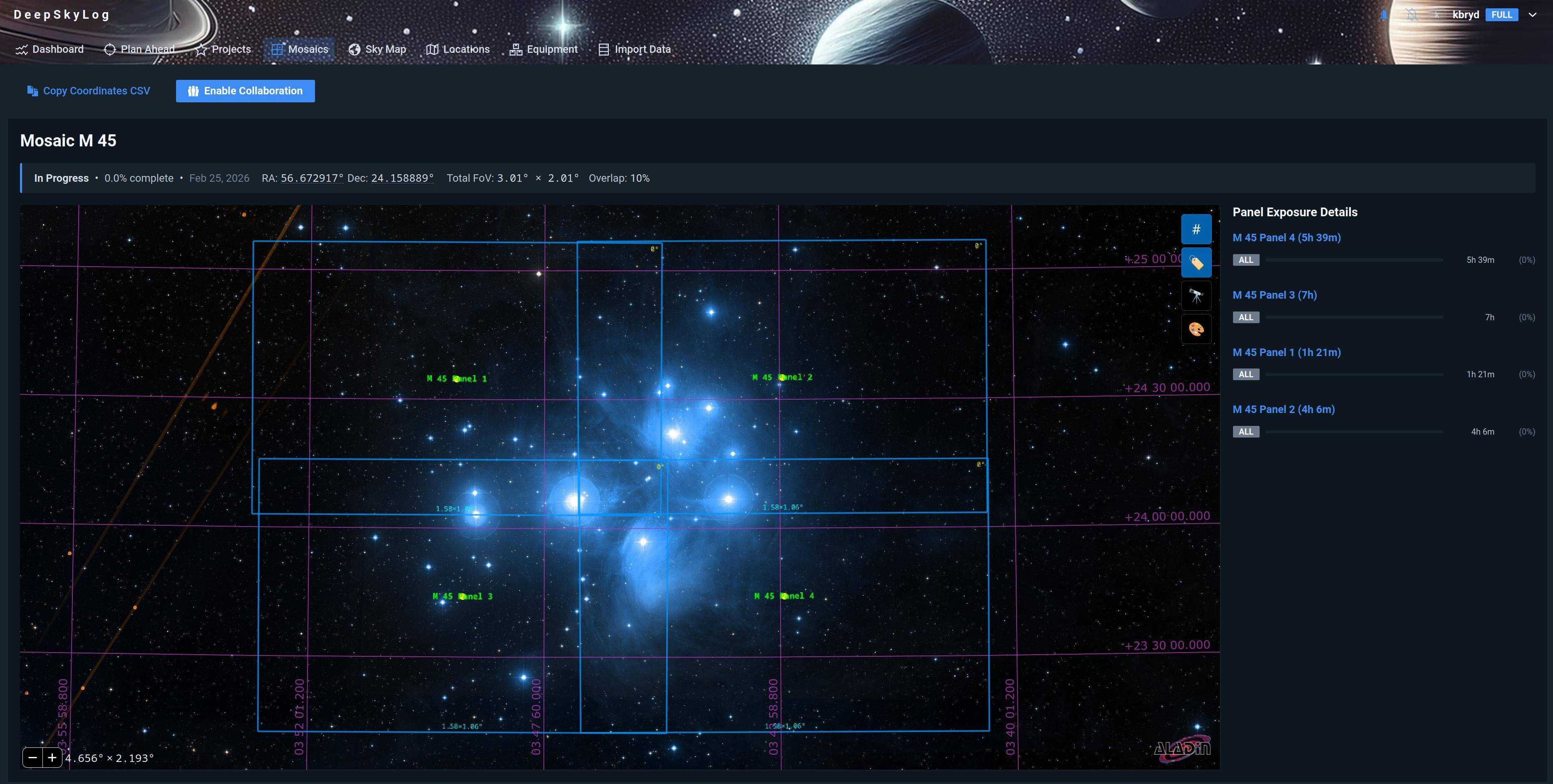
Once a mosaic is assembled, opening it shows all panels on the sky map simultaneously. You can see:
- The combined sky coverage of all panels
- Individual panel outlines color-coded by filter or completion status
- Gaps in coverage that still need imaging
Planning New Panels
The sky map’s Frame Preview tool lets you plan future panels by overlaying a camera FOV footprint at any sky position. This helps you figure out pointing coordinates before a session.
Previewing a Larger Mosaic
The ⊞ Preview a Larger Mosaic button in the sky map toolbar adds + / − controls along the four edges. Use them to extend the grid with extra rows or columns; DeepSkyLog predicts where the new panels would fall and draws them in gold. These preview panels are not saved - click Reset preview to clear them.
Copying Panel Coordinates
Click any panel on the sky map - an existing panel or a gold preview panel - to copy its RA/Dec to the clipboard. To export every panel at once (preview panels included), use the Copy Coordinates CSV button.