The DeepSkyLog Uploader: bring your FITS archive into DeepSkyLog
A desktop app for Windows, macOS and Linux that scans your session folders, measures the stars and uploads the metadata to DeepSkyLog.
Years of captures sit in folders on a disk or a NAS, and until now bringing them into DeepSkyLog meant the browser import or the command-line tool. The DeepSkyLog Uploader is a desktop app for exactly that, and it works on every plan.
What it does
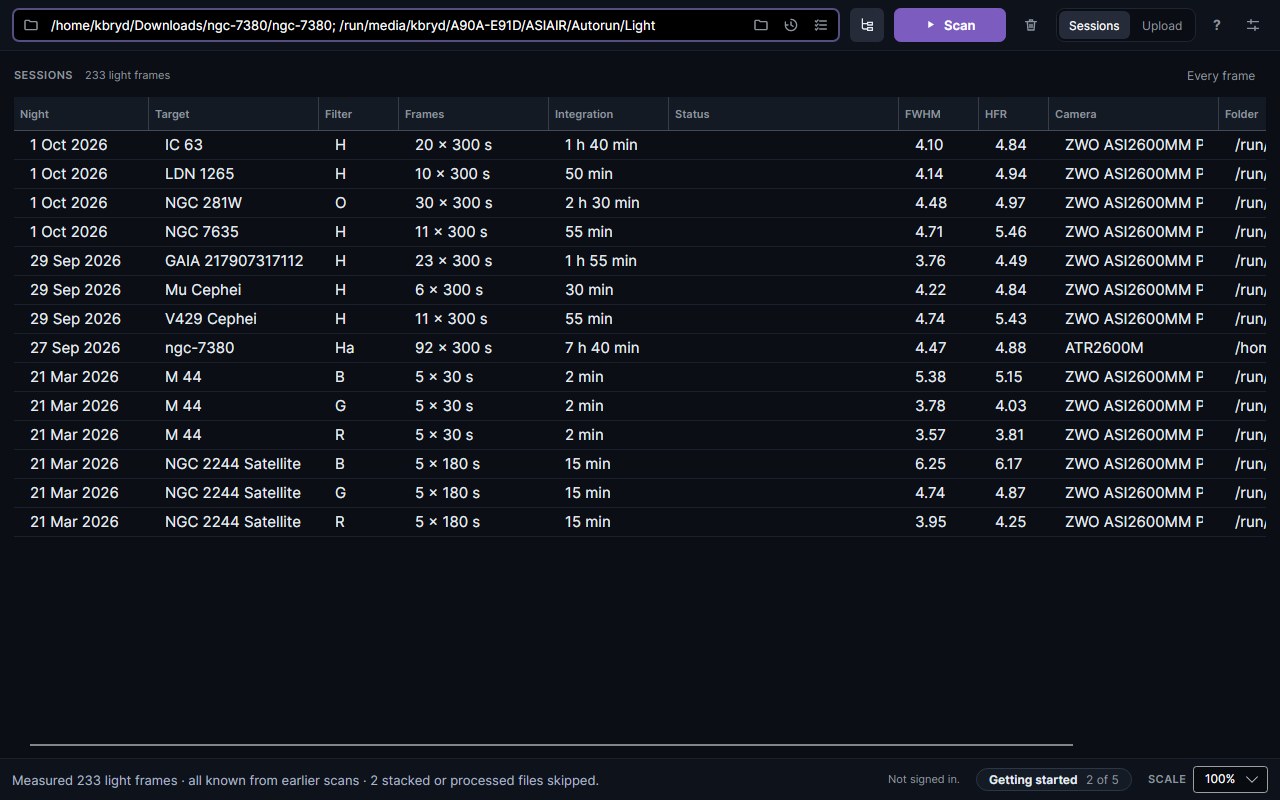
Point it at your session folders and press Scan. It reads every FITS and XISF light frame, skips darks, flats, bias frames and stacked files, and shows what it found as sessions: one line per target, night and filter, with the frame count, the integration time and the star size.
Then sign in, and the Upload tab groups the frames by target, night and rig. Most locations and equipment are matched from the FITS headers; where one is missing you pick it, or create it from what the headers say. Press Upload and the frames go up - only the metadata and the measurements, never the images.
Why it’s more than an import
- It measures the stars itself. HFR, FWHM and eccentricity are measured on your computer, the same way N.I.N.A does it, so frames from software that doesn’t record them - ASIAIR, for one - arrive with star metrics.
- It uses NINA’s session files. If NINA’s Session Metadata plugin wrote
ImageMetaData.jsonandWeatherData.jsonbeside your frames, the app finds them and adds the guiding, sky background and weather to each frame. If they’re somewhere else, it asks. - It remembers what went up. Scan the same archive next month and only the new nights are offered. When you open the app, it also tells you which folders gained frames since your last scan.
- It stays within your plan. On Free and the trial it shows how much of your projects and frames you have used, and an upload that would go over a limit sends what fits and says why the rest stayed behind.
The first time you open it, a Getting started panel walks you through the five steps, from choosing a folder to the first upload.
Get it
Downloads for Windows, macOS (Apple Silicon) and Linux, and a full guide, are on the DeepSkyLog Uploader page. Nothing needs installing: unzip it and run it, or on macOS open the disk image and drag the app into Applications.
The Uploader replaces the old DeepSkyLog Sync app. For scripts, scheduled syncs and headless machines, the command-line tool is still there.