Add your local horizon to improve planning
Locations can now have a horizon, drawn or imported from a .hrz file, and every planning view uses it.
A target at 40 degrees is no use if it’s behind your neighbor’s roof. Until now planning only knew a flat minimum altitude. Locations can now carry a local horizon, and every planning view uses it.
The rule
A target counts as usable when its altitude is above both:
- the horizon at its current azimuth, and
- your minimum altitude setting.
The minimum altitude keeps its job (seeing, airmass). The horizon only adds the obstructions. A location without a horizon behaves exactly as before.
Getting a horizon in
Open a location and press Horizon. The same button is in the location’s edit dialog. There are three ways to fill it:
- Draw it. The panorama runs from north through east, south and west and back to north. Click to add a point, drag to move one, double-click to delete one.
- Import a .hrz file. This is the APCC and N.I.N.A. format, so a horizon you already made for your mount or for N.I.N.A. loads as is. A file with a bad line is rejected with the line number.
- Export it. Download the result as a .hrz file to use in other software.
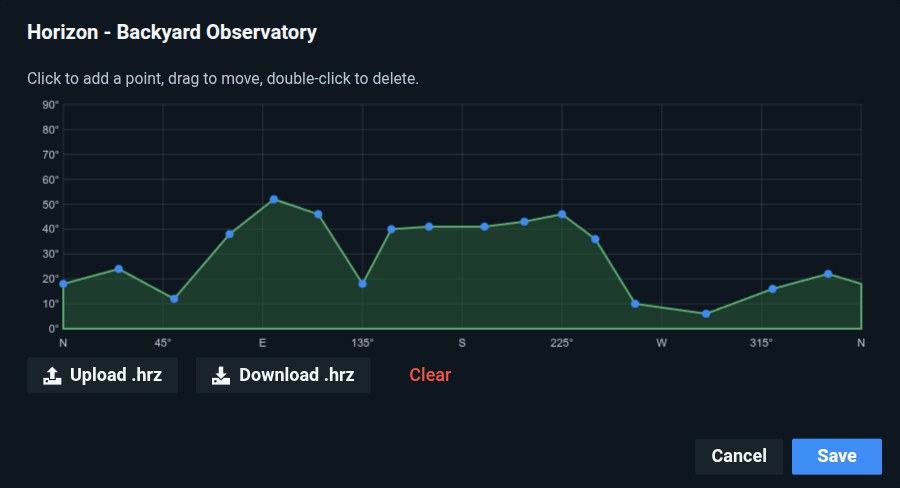
Locations that have a horizon show a HORIZON tag on their card and page header.
How Plan Ahead scores a project
Plan Ahead ranks your projects for the night by adding up four parts:
- Tonight (the biggest part). For each filter you can use tonight, up to 60 points for how long the target is visible (the score tops out at 4 hours), plus 10 if that time falls in astronomical night, plus up to 5 for distance from the moon. The result is averaged across your usable filters. On top of that come up to 10 points for having several usable filters, and up to 20 for a night that suits your filters: broadband while the moon is down, narrowband while it is up.
- Progress. A project that is partly done scores higher than a new one, and one that is almost finished gets the most (30 points) so you finish it. A project that is already complete drops to 5.
- Priority. The project’s priority from 0 to 5, doubled, so up to 10 points.
- A flat 5 for every project.
A project with no usable filter tonight scores zero for the first part, so it sinks to the bottom whatever its progress.
The horizon feeds the first part. Visible time is now time above your horizon, so a target that is only reachable behind your house stops earning its 60 points.
What changes in planning
- Night timeline. Windows where the target is behind the horizon are blocked (green color) and labeled as such, separately from “too low”.
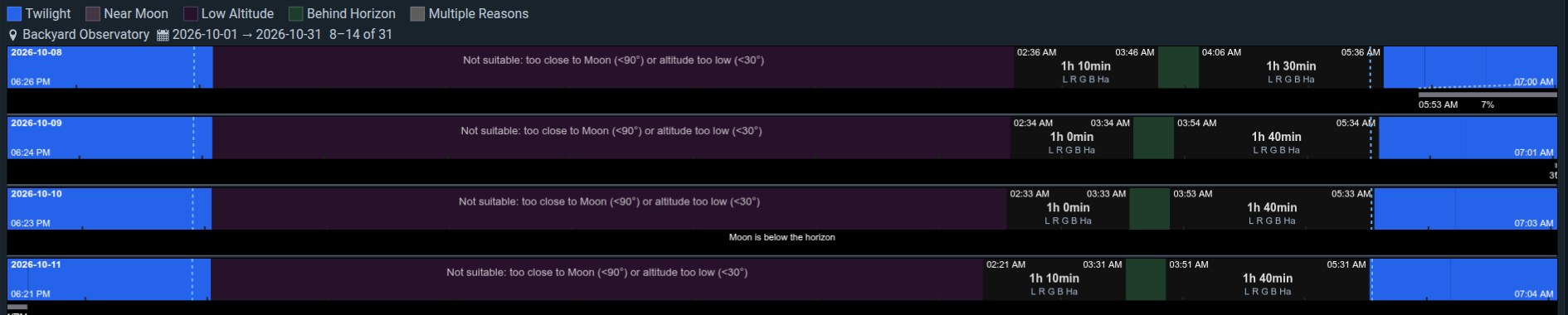
- Altitude chart. The horizon is drawn along the target’s path as one combined limit line, and the imaging window is shaded only where the target clears it.

The dashed line is the horizon in the direction the target is facing at that moment, so it only follows the part of your profile the target passes through tonight. Where the red path is above it, the target is usable. Where the dashed line sits on the flat minimum altitude, the horizon there is lower than your minimum and only the minimum matters.
- Plan Ahead. Only time above the horizon counts as visible time, so projects hidden behind an obstruction rank lower.
- Tonight summary. Rise and set mean clearing the horizon and dropping behind it. If a target dips behind an obstruction and comes back, you see its longest clear stretch tonight.
- Next observable night. Targets hidden behind the horizon are no longer promised.
More in the docs: setting up a horizon and the Plan Ahead screen.