Planning around the moon: which filter tonight?
Plan Ahead scores each project by how well the night's moon suits its filters, worth up to 20 points.
A bright moon doesn’t have to mean a lost night. It only rules out some filters. Plan Ahead now works out which ones.

Why the moon matters more to some filters
Moonlight is scattered sunlight, spread across the whole visible spectrum. A broadband filter (L, R, G, B) collects all of it, so LRGB wants the moon below the horizon.
A good narrowband filter rejects most of it, and how much depends on where the band sits:
- Ha and SII are deep red, where a moonlit sky is darkest. These are the best choice when the moon is up.
- OIII is blue-green, close to the peak of the moonlit sky. It’s still usable, but it suffers first.
- Dual-band filters (L-eXtreme, L-Ultimate, NBZ and similar) sit in between.
What Plan Ahead does with it
For each project, Plan Ahead splits the target’s window into the minutes the moon is down and the minutes it’s up. Each filter gets a suitability from 0 to 1: the dark minutes and the moonlit minutes, each weighted by what that sky is worth to the filter’s band.
| Band | Moon down | Moon up |
|---|---|---|
| LRGB (broadband) | 1.0 | 0 |
| Ha | 0.5 | 1.0 |
| SII | 0.5 | 0.85 |
| Dual-band | 0.5 | 0.7 |
| OIII | 0.5 | 0.6 |
A dark sky is worth the most to broadband, and narrowband is still worth doing under it. Under the moon only narrowband is.
The project’s filter match is the suitability of the best filter that is usable tonight, times 20, rounded. That is up to 20 points added to the project’s score. For a project whose window is:
| Window | LRGB | Ha | Dual-band | OIII |
|---|---|---|---|---|
| Moon down all night | 20 | 10 | 10 | 10 |
| Half moon down, half up | 10 | 15 | 12 | 11 |
| Moon up all night | 0 | 20 | 14 | 12 |
Only the best filter counts, so a project that shoots both LRGB and Ha has something worth doing either way. A project that shoots only LRGB under a moon that is up all night gets 0 for this part.
On each project card, the filters that suit tonight best get a green ring around their name badge. Filters that are not usable tonight are dimmed. Here LRGB is dimmed and Ha is ringed, with its usable window next to it:
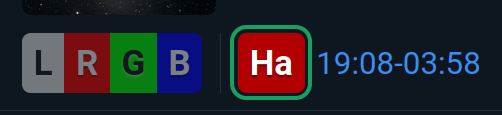
The ring goes to the best-suited filter you can use tonight, and to any filter that is practically as good. On a dark night that means L, R, G and B are all ringed. Hover a ringed badge to see why: either the moon is below the horizon for most of the window, or the filter cuts through the moonlight.
When a goal is set, a percentage next to a filter shows its goal progress. Hover it to see captured versus target exposure.
Filter windows shorter than the project’s minimum visible time are dropped, so a 10-minute gap between moonset and dawn no longer counts as a usable window.
The filter match is one of several parts of the score. The others are described in Add your local horizon.
Make sure your filters are classified
Plan Ahead decides narrowband or broadband from the NB checkbox in the filter list under Equipment. The name only tells it which line the filter is. Filters created by a NINA upload get NB from their name, so check that list once, especially for filters with unusual names. A narrowband filter with an unrecognized name is treated as dual-band.
More on the screen itself: Plan Ahead docs.